
The puff counter function helps users track device usage more accurately.Different models and firmware versions may apply different reset methods. This guide summarizes the puff counter reset procedures across devices and chipsets for easy reference. • SXmini SL Class V2 Enter Menu → Select “Puff Reset”. • SXmini G Class V2 Enter Menu → Select “Puff Reset”. • YiHi SX600J Chipset Charging the device automatically resets the puff counter. • YiHi SX735J Chipset Enter Menu → Select “Puff Reset”. • SXmini Puremax 2 • Firmware before 20250227: Charging resets the puff counter.• Firmware 20250227 and later: Long press the fire button for 5 seconds without pod installed. • SXmini MQ Class • Version V49 and earlier: Charging resets the puff counter.• Version V50: Long press the fire button for 5 seconds without atomizer attached. • SXmini Tinder Wave Enter Menu → Select “Puff Reset”. • SXmini MQ Plus Long press the fire button for 5 seconds without atomizer attached. • SXmini Nex I Long press the fire button for 3 seconds without pod installed. Firmware Version Information Firmware version details may appear in different locations depending on the device model: • Inside the system menu under version information• Briefly displayed on the boot screen when powering on If you are unsure about your firmware version, please refer to the product manual or contact official support.

With more ways to enjoy nicotine today, it’s important to understand the differences between vaping, heat-not-burn (HNB) devices, and traditional smoking. SXmini is dedicated to providing safer, enjoyable alternatives, and this guide helps you make informed choices. 1️⃣ Traditional Smoking What it is:Burning tobacco in cigarettes to inhale smoke. Key points:– Produces harmful substances such as tar and carbon monoxide.– Strong throat hit and classic tobacco taste.– Widely available and familiar to smokers. SXmini insight: Traditional smoking carries higher health risks compared to modern alternatives. 2️⃣ Heat-Not-Burn (HNB) Devices What it is:Devices that heat tobacco units without burning them, producing a tobacco-flavored aerosol. Key points:– Reduced harmful chemicals compared to traditional cigarettes.– Maintains some tobacco-like experience.– Uses special tobacco units instead of e-liquid. SXmini insight: HNB devices are popular for smokers looking to reduce harm while retaining a tobacco-like experience. HNB products are different from vaping products and are not designed for e-liquid. 3️⃣ Vaping (E-Cigarettes) What it is:Devices that vaporize e-liquids instead of burning tobacco. Key points:– Uses open pod systems or box mods (device shape may vary).– Produces vapor instead of smoke, with fewer harmful substances.– Wide variety of flavors and nicotine strengths available.– Devices like SXmini Puremax 2 and Puremax Q feature temperature control, dry burn protection, and e-liquid level vibration alerts for safer, more consistent use.– SXmini MQ Class and G Class V2 offer advanced performance and temperature control. SXmini insight: Vaping offers flexibility, flavors, and reduced harm. SXmini devices cater to both beginners and advanced users seeking performance, control, and a personalized experience.
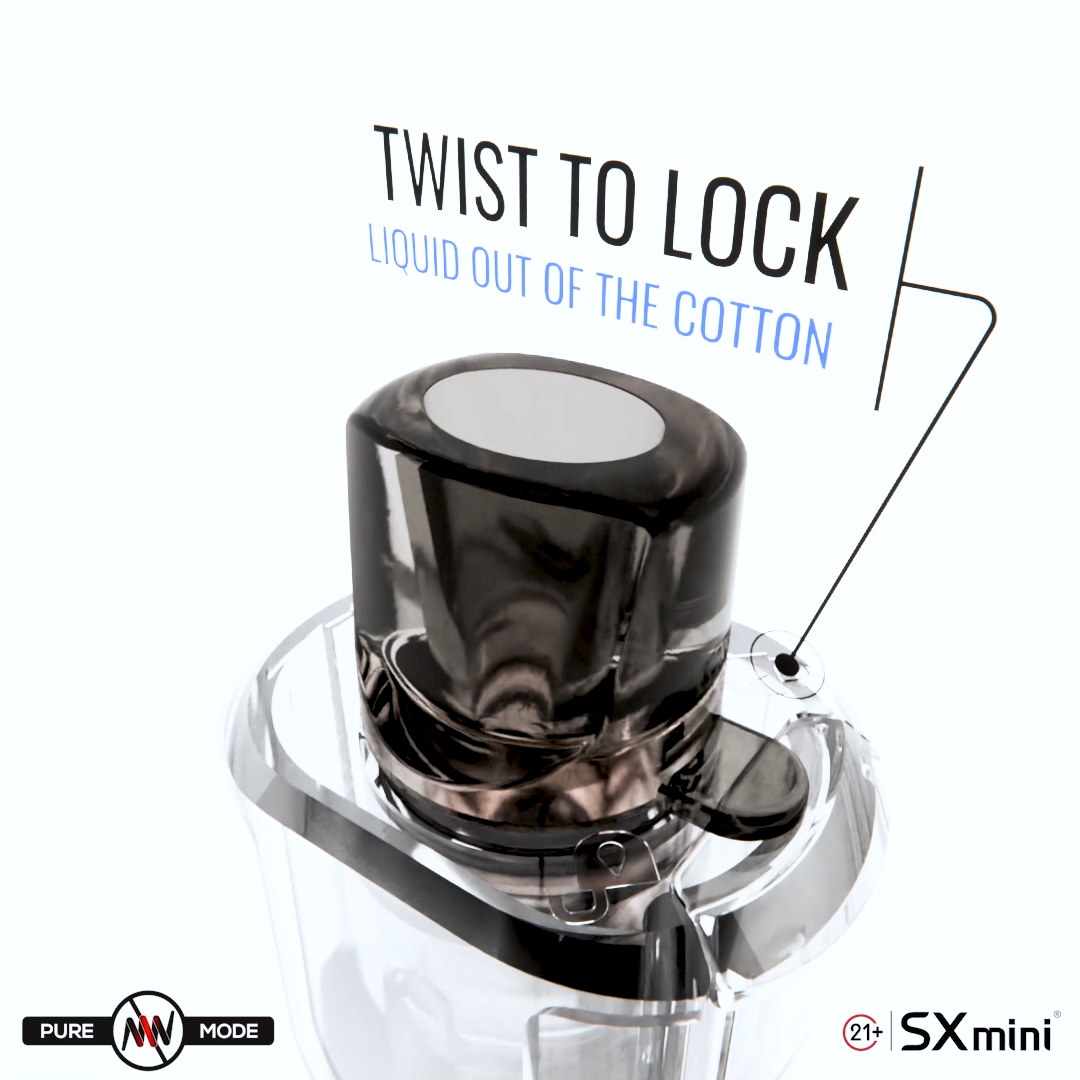
✈️ Traveling with Your Vape Device When traveling, proper handling and packing of your vape is essential. – Travel lock: Only PX Cartridge series, PX Pro Cartridge series, and future SXmini pods feature travel lock functions to prevent accidental activation.– Protect the fire button: Always ensure the fire button on the device is protected to prevent auto-fire incidents, and handle the pod carefully to avoid leakage. Important: Lithium battery devices are prohibited in checked luggage. Electronic cigarettes are not allowed for use on airplanes. 🛡️ Preventing Leaks – Keep the device upright whenever possible.– Keep the pod securely attached and rotate it to travel mode when not in use to lock it, preventing accidental activation and leakage.– Store pods in a sealed bag or container for extra protection.– Regularly inspect the pod and device for any damage, cracks, or loose connections. 💡 Additional Tips – Avoid exposing the device to extreme heat or direct sunlight.– When storing the device long-term, partially charge it and recharge at least once a month to maintain battery health. ✅ Summary Safe travel with a vape requires attention to device power-off, fire button protection, pod locking, and proper storage. SXmini PX Cartridge and PX Pro Cartridge systems (and upcoming pods) feature travel locks, and careful handling ensures a leak-free, safe journey.
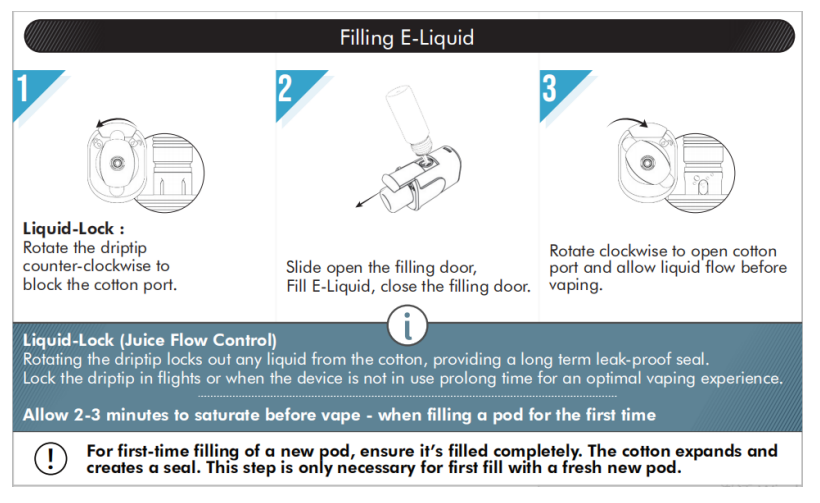
🌱 Why Choose Open Pod Systems? Open pod systems are refillable vaping devices that allow users to choose their preferred e-liquids. Compared to disposable or prefilled pods, open pods are:– More eco-friendly– More cost-effective– More flexible in flavor and nicotine selection SXmini open pod devices (such as Puremax 2 and Puremax Q) combine portability with smart safety features like vibration alerts, helping users enjoy vaping with confidence. 🔧 Daily Usage Tips 1. Filling E-Liquid– Always use high-quality e-liquids from trusted brands.– Avoid overfilling the pod to prevent leakage.– Wait a few minutes after filling before vaping, allowing the coil to absorb the e-liquid. 2. Avoiding Dry Burns– Some SXmini pod cartridges (such as the PX Cartridge and PX Pro Cartridge series, and upcoming pod models) are equipped with dry-burn protection, which automatically stops heating when e-liquid is insufficient.– Devices like Puremax 2 and Puremax Q provide vibration alerts to remind you when it’s time to refill. 3. Cleaning the Pod– Do not rinse the pod with water.– Instead, use a cotton swab or alcohol wipe to gently clean the pod’s exterior and connection points.– This keeps the device free of residue and ensures smooth performance. 4. Charging Safely– Use a reliable, good-quality charging cable (the original or a high-quality phone charging cable).– Do not overcharge; unplug the device when it’s fully charged.– If you leave the device unused for a long time, recharge it at least once a month to maintain battery health. 💡 Maintenance Reminders – Replace pods or coils regularly to ensure flavor quality.– Store the device in…


